How clubs get members to see the events calendar
Why members miss club events, and how to put each department's events on the phone calendars of the members who want them.
By Armen Suny · Updated
The short answer
Members miss events when the calendar sits somewhere they have to go looking, like the club app or a newsletter they skim. Keep one master calendar in your club software and send its events into members' own phone calendars, where they show up next to the rest of their week. Let each member choose the departments they care about, which keeps junior golf clinics off the calendar of someone who only comes for dinner. Save text messages for changes on the day.
Why do members say they didn't know?
GroupValet, which sells member engagement software to clubs, puts “We Didn't Know About That Event!” first on its list of seven common club management nightmares. In its words, “Members often say they missed out on events because they never saw the email or flyer.”
A post on the Strategic Club Solutions blog traces the problem to how clubs send things. Each new need sets off its own email, and before long members get five or six messages in a short window. The post calls this the reactive communication trap, and it says that when messages arrive without a pattern, members skim or disengage altogether. Its fix starts with asking where each kind of message belongs and then keeping to that pattern, so members learn where to look.
The calendar itself lives in the club's software. Northstar's product pages describe events that flow “to the Member Website and Smartphone App for Calendar display and Reservations,” and Clubessential's help pages say events from the website calendar “will be automatically pulled into the Mobile App's Calendar module.” A member opens that app to book a tee time or look at a statement, while the junior clinic three weeks away sits a few taps from where they were looking.
Where should each kind of message go?
A ClubMarketing post on member communication gives each channel a job. “Email is your official record,” it says, and text messages are for time-sensitive action, since text “is interruptive by design.” Add members' own calendars to that list and the split looks like this.
| What you're sending | Where it goes | Why there |
|---|---|---|
| A new event, or the season's schedule | Members' phone calendars, by department | It sits in their week, and a moved date can move with it |
| Menus and sign-up details | The event's page in your club software, linked from the calendar entry | Sign-up stays in the system that takes the booking and the charge |
| Board notices and dues | It's the club's official record | |
| The week ahead | One email, sent on the same day each week | A set day and format teach members where to look |
| A rain delay or a closed course, today | A text, and move the calendar entry too | A same-day change needs to interrupt |
How do events get onto members' phone calendars?
An “Add to calendar” button in an email gives the member a copy of that one event. Microsoft describes an imported calendar file as a snapshot that won't pick up later changes, so when the member-guest moves to Sunday, the copy on their phone keeps Saturday.
For a calendar that keeps up with you, a member either subscribes to a link to your calendar or connects their Google or Outlook calendar so events can be written into it. A subscription changes when the member's app next checks the link, and AddEvent, which hosts subscription calendars, puts Google Calendar's checks at every 12 to 24 hours. A connected calendar changes within moments. Our guide on “Add to calendar” buttons and subscriptions compares them. Whether your club software has a subscription link of its own is a question for your vendor, and our guide to syncing the club calendar to members' phones lists what to ask.
Why let members choose departments?
One club calendar with everything in it fills up fast with tennis clinics, kids' camps, wine dinners and men's league. A member who only comes for dining can hide the whole calendar with one tap, and from then on they miss the dining events as well. GroupValet's answer to the “didn't know” complaint runs the same way: members “can opt in to notifications for their preferred groups and activities.”
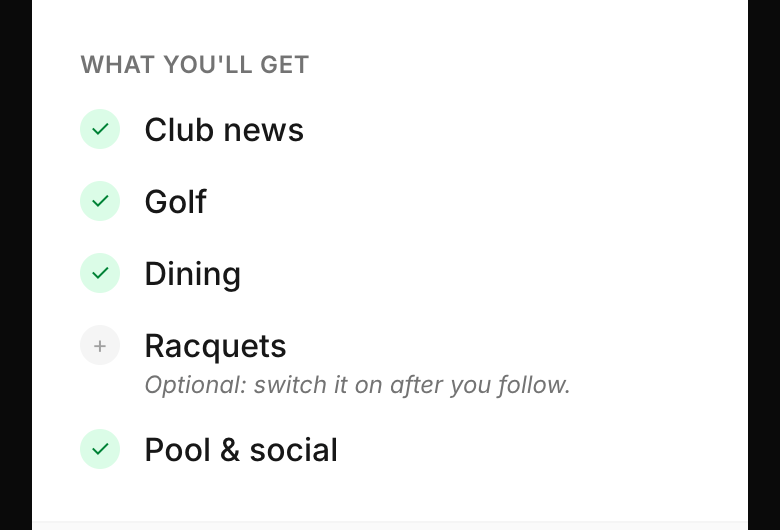
Use the departments your members already name: Golf, Dining, Racquets, Aquatics, Social, Juniors. Decide which ones start switched on for everyone, like club news, and let members add the rest. Inside a department, programs such as men's golf or junior tennis can get events of their own, sent only to the members enrolled in them.
How do members find out they can sign up?
- At new member orientation. Set it up on their phone with them before they leave the clubhouse.
- A QR code where members wait. The pro shop counter, the starter's window, the grill room table tents and the fitness desk.
- One email to the membership with a single link, and a reminder a few days later to the members who haven't joined.
- Every newsletter and statement carries one line and the QR code.
- Staff answers. When a member asks a department head when the next clinic is, the answer includes how to get those dates on their phone.
Where TheyCal fits
We make TheyCal, and it works alongside your club software, which stays the master calendar and keeps handling sign-ups and billing. You bring the calendar in as a spreadsheet exported from that software, or from a calendar link if your software has one, which TheyCal checks daily. A department column in the spreadsheet sorts the events: you match each department to a channel once, and from then on Golf events go to members who have Golf switched on. Upload a newer export and the changes carry through.
Members follow the club once, from its join page or QR code. If they're on Google or Outlook, they connect that calendar, and we add the club's events to it and keep them current as you change them. Apple Calendar users get a private calendar link of their own. You can tag members by program and send an event to the members with that tag, and when someone taps a sign-up link in an event, you see who tapped it.
Common questions
Should we stop sending the weekly email?
Keep it, on a fixed day and in a fixed shape. The Strategic Club Solutions post counts on a predictable weekly email becoming “a trusted touchpoint.” Once the dates are on members' calendars, the email has room for the things worth reading about.
What about members who don't use a phone calendar?
Keep the printed calendar and the board in the clubhouse for them. Anyone with an email address still gets the weekly roundup.
Will members feel spammed?
They choose their departments and can switch one off or unfollow whenever they like. With TheyCal, unfollowing takes the club's upcoming events off their calendar, and club events show as free time, so a wine dinner never makes anyone look busy at work.
Who should keep the calendar up to date?
Give one person the master calendar in your club software. Department heads send their dates to that person, so a date that changes gets fixed in one place.
Sources
- GroupValet: 7 common club management nightmares and how to fix them for good
- Strategic Club Solutions: Why your members “didn't see the email”
- ClubMarketing: Communication confusion, how to reach your members where they are
- Northstar: Golf club food and beverage software
- Clubessential Client Education Resource Center: Managing the mobile app
- Microsoft Support: Import or subscribe to a calendar in Outlook.com or Outlook on the web
- AddEvent: How can I automatically update events in subscribers' calendars after they subscribe?