How to subscribe to a calendar on Android
Google Calendar's Android app can't add a calendar link, so you add it on the web and turn on sync. ICSx⁵ does it from the phone alone.
By Armen Suny · Updated
The short answer
The Google Calendar app for Android has no way to subscribe to a calendar link. Add the link once in Google Calendar in a computer's web browser, signed in to the Google account your phone uses, under Other calendars and then From URL. Then, on the phone, open the app's settings, tap the new calendar and turn on Sync. To do it all from the phone, an app called ICSx⁵ downloads the link on a schedule you set and puts the events in a calendar your calendar app can show.
Why can't I subscribe in the Google Calendar app?
Google's help says: “To subscribe to a new calendar, you must use a computer web browser. You can't subscribe to a calendar in the Google Calendar app for Android, iPhone, or iPad.” So the link goes into your Google account on the web, and the app on your phone picks it up from there once you turn on its sync.
Indiana University's calendar documentation gives the same route for its own event feeds on Android: add the feed to Google Calendar, then sync it to the phone. It's a one-time job for each calendar.
How do you add a calendar link through Google Calendar?
- Copy the calendar link from wherever the business or club shares it.
- On a computer, open Google Calendar in a browser and sign in with the Google account your phone uses. Indiana University's steps make the same point.
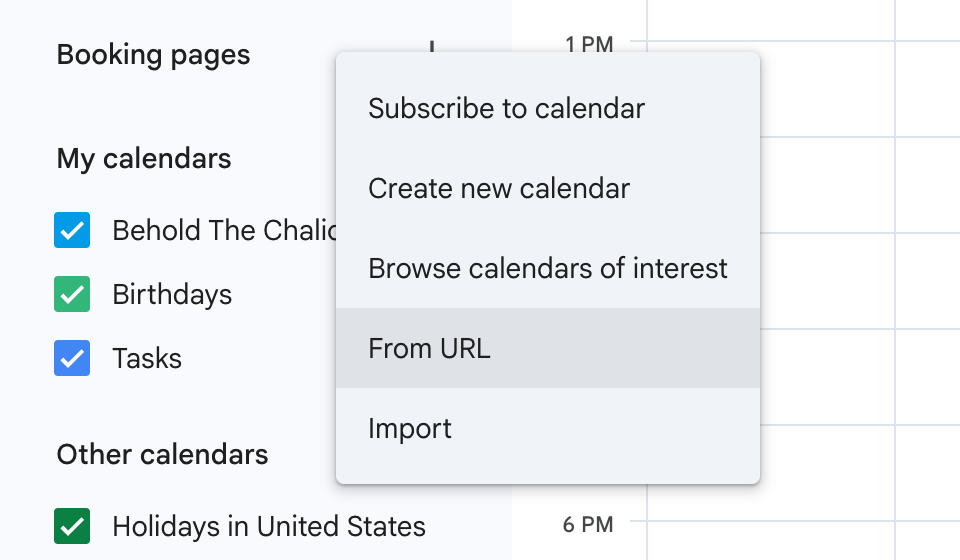
- Next to Other calendars, click Add other calendars (the plus button) and choose From URL. Paste the link and click Add calendar. It appears in the list under Other calendars.
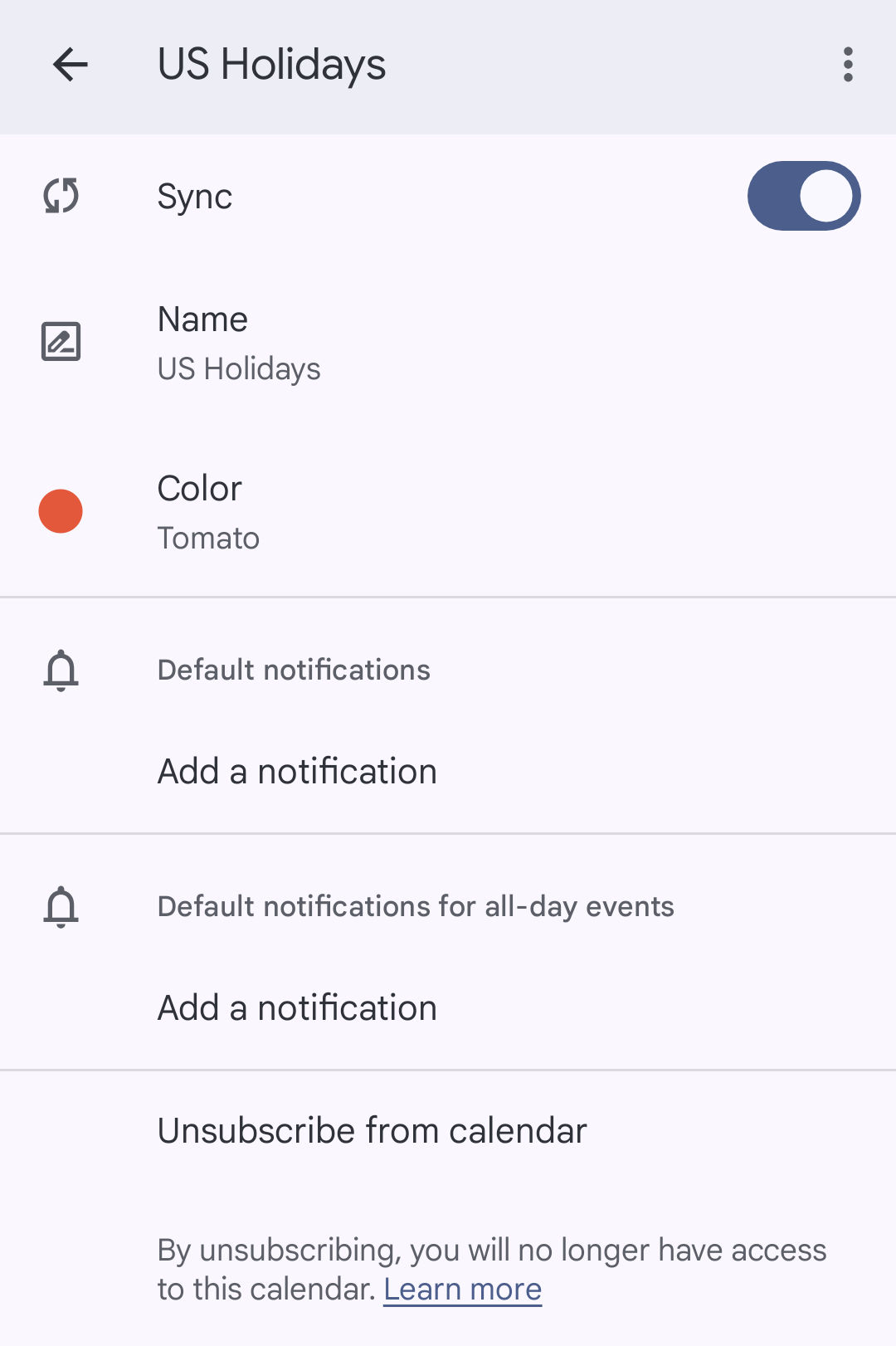
- On your phone, open Google Calendar, tap Menu, then Settings. Tap the new calendar, or Show more if it isn't listed, and turn on the Sync setting at the top.
- Go back to the Menu and make sure the box next to the calendar's name is checked, or its events stay hidden.
From then on Google fetches the link again on its own timing. AddEvent, which hosts subscription calendars, puts Google Calendar's checks at every 12 to 24 hours. Our guide on why a subscribed calendar isn't updating covers each app's delay.
Can you subscribe on the phone without a computer?
Yes, with an extra app. ICSx⁵ is an open-source Android app for subscribing to calendar links. Its developers say it will “download each iCalendar file regularly at a given interval” and put the events into a read-only calendar on the phone, which your usual calendar app can then show. They sell it in app stores such as Google Play “for a small fee”, and it's also on F-Droid.
Its instructions give two ways in. You can tap the plus button in ICSx⁵ and paste the link. A link starting with webcal:// works from your browser too: tap it, and if the phone asks which app should open it, pick ICSx⁵.
Which way should you pick?
| Google Calendar on the web | ICSx⁵ on the phone | Connecting your Google account | |
|---|---|---|---|
| Where you set it up | A computer's browser, then the Sync setting on the phone | On the phone | On the business's sign-up page, where it's offered |
| How changes arrive | When Google next fetches the link, every 12 to 24 hours by AddEvent's estimate | At the interval you set in the app | The business's service updates the event in your calendar |
| What you install | Nothing | The ICSx⁵ app | Nothing |
| Good for | Anyone who can get to a computer once | People without a computer, or who want to set the refresh timing | Events that change at short notice |
Where TheyCal fits
We make TheyCal, and its join pages give Android users a shorter route. Pick “Continue with Google” and there's no link to paste: we create the business's events in your Google calendar and update or remove them whenever the business changes something. Our guide comparing “Add to calendar” buttons and subscriptions explains how that differs from a link.
Anyone who'd rather have a link picks “Apple Calendar & others”, confirms their email address and gets a private calendar link of their own. Its page has a Copy button for pasting the link into any app that subscribes from a URL, along with an offer to connect Google or Outlook instead.
Common questions
I added the calendar on my computer. Why isn't it on my phone?
Check its Sync setting in the app's settings and the box next to it in the Menu. Google also says to make sure Calendar is switched on under Account sync for your Google account, in the phone's own Settings app, and to try Refresh in the app's Menu. It warns that “it might take some time for your events to show up after you turn on sync.”
Do I need a computer every time?
Once for each calendar. After that the subscription stays in your Google account, and Google keeps fetching it.
Will the calendar show in Samsung Calendar?
Samsung's help lists Google among the calendars its Calendar app can display. If one is missing, open the app's menu, tap Manage calendars and switch on the ones you want to see. Samsung also says to check that sync is turned on for your Google account in the phone's Settings.
How long do changes take to reach my phone?
For a calendar added through Google, AddEvent's estimate is every 12 to 24 hours. With ICSx⁵ it depends on the interval you set in the app.
Sources
- Google Calendar Help: Subscribe to someone else's calendar (Android)
- Google Calendar Help: Subscribe to someone else's calendar
- Google Calendar Help: Fix sync problems with the Google Calendar app (Android)
- AddEvent: How can I automatically update events in subscribers' calendars after they subscribe?
- Indiana University: iCal Feed Subscription for Android
- ICSx⁵ and ICSx⁵: Usage
- Google Play: ICSx⁵
- F-Droid: ICSx⁵
- Samsung: Unable to see an event in the Samsung Calendar app