Can I just use a public Google Calendar for my business's events?
For plenty of businesses a public Google Calendar does the job. How customers get your events from it, and where it falls short, from Google's own help pages.
By Armen Suny · Updated
The short answer
Yes, and for plenty of businesses it's all they need. Google lets you make a calendar public, show it on your website and hand out a link that customers add to their own calendar app. It starts to fall short when a change has to reach people the same day, or when different customers need different events. And anyone on Google Calendar has to add it from a computer, since Google says the phone apps can't subscribe to a calendar.
How do you make a Google Calendar public?
Give the business a calendar of its own first. Google's help gives the same example: “a public calendar you share with everyone, and a private calendar that only you can check.” Then, on a computer (Google only lets you change sharing settings there):
- Open Google Calendar and click Settings at the top right.
- Under “Settings for my calendars,” click the calendar you want to share.
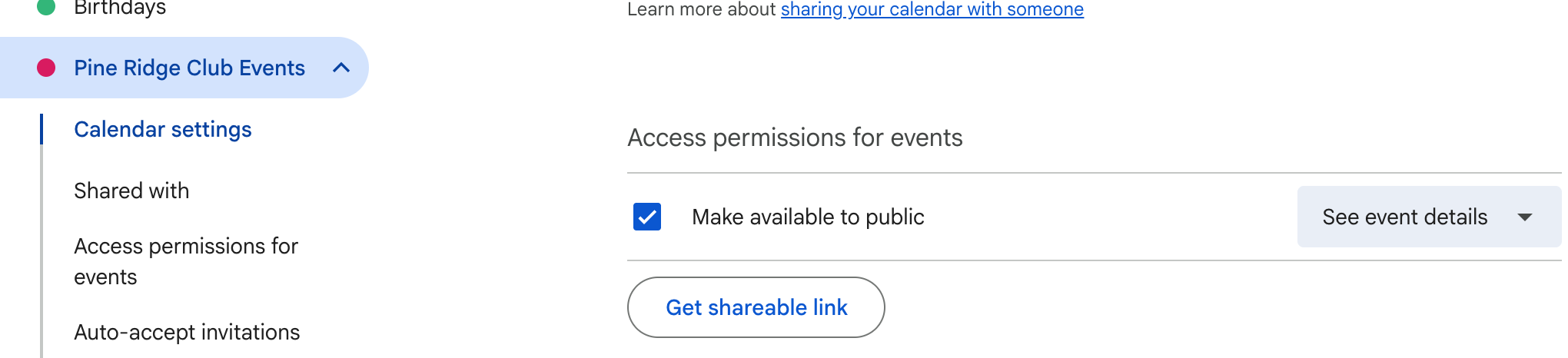
- Under “Access permissions for events,” tick “Make available to public” and click OK.
- In the menu beside it, choose “See event details.” When we made a test calendar public in October 2026, that menu started on “See only free/busy (hide details),” which shows people the times you're busy and nothing else.
On a Google Workspace account, Google notes that your administrator may restrict these settings.
How do customers get your events from it?
| What you share | Where you find it | What customers do with it |
|---|---|---|
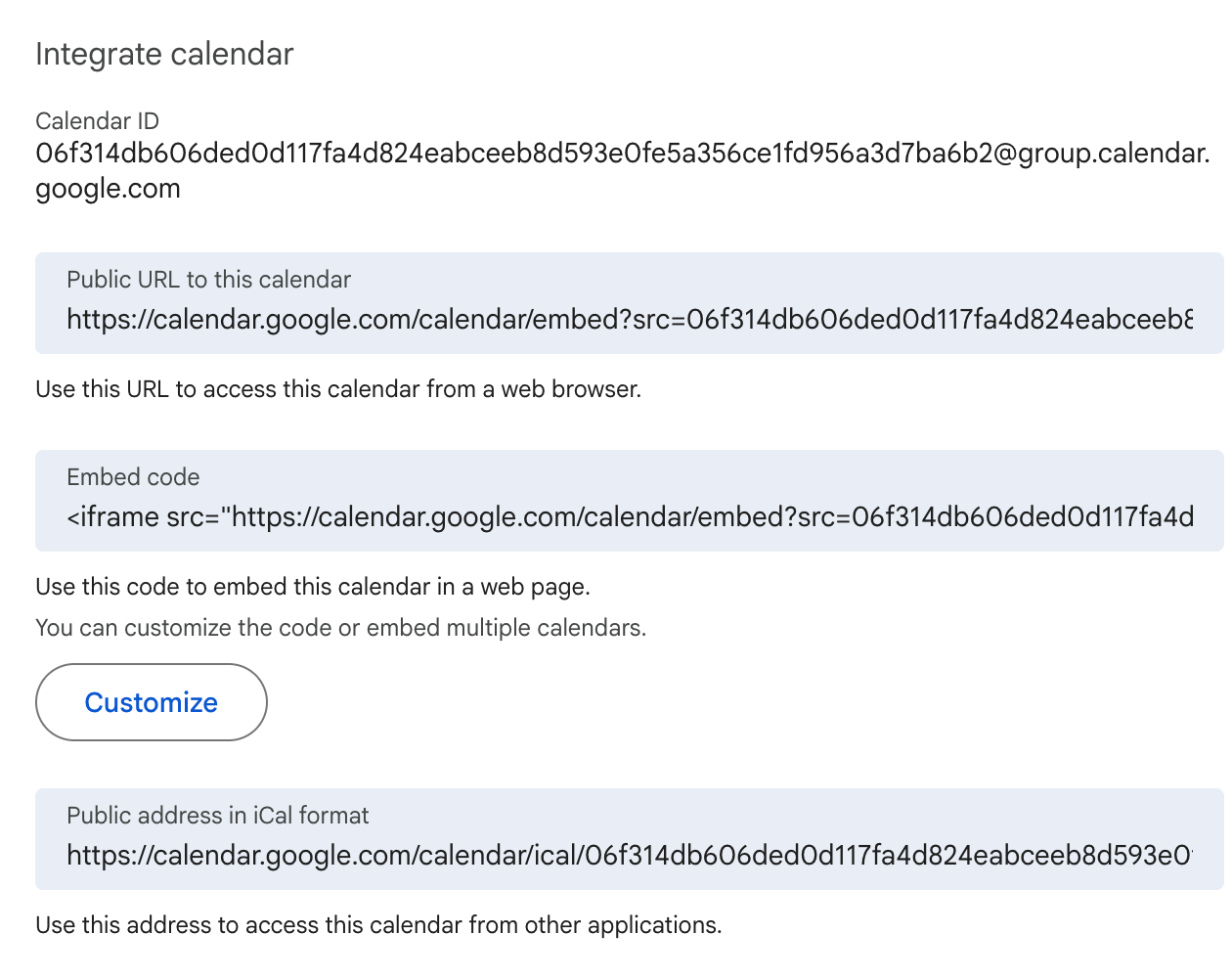
| The calendar on your website | Settings, Integrate calendar, Embed code | Browse it on your site, and click Add to Google Calendar at the bottom left to subscribe |
| A shareable link | Access permissions for events, Get shareable link | Subscribe in Google Calendar |
| The public URL | Integrate calendar, Public URL to this calendar | View it in a web browser without signing in or subscribing |
| The iCal address | Integrate calendar, Public address in iCal format | Subscribe in Apple Calendar on an iPhone or Mac, Outlook and other calendar apps |
| One event | Open the event, More actions, Publish event | Save that single event to their calendar |
Google's pages on public calendars and adding a calendar to your website walk through each of these. Subscribers see your events without being able to change them, or as Apple puts it, “The events shown in a subscription calendar are controlled by the provider.”
When is a public Google Calendar enough?
When everyone should see the same events and those events stay put once you post them. Think of a brewery's trivia nights or a bookshop's monthly readings. You add each event once. The calendar on your website stays current, and regulars who subscribe see new dates turn up in their app.
It's free, and if your customers mostly check your website for what's on, an embedded calendar does that job well.
Where does a public Google Calendar fall short?
- Google Calendar users need a computer to subscribe. Google's help says “To subscribe to a new calendar, you must use a computer web browser. You can't subscribe to a calendar in the Google Calendar app for Android, iPhone, or iPad.” A customer who finds your link on their phone has to remember it later at a computer. Our guide to subscribing to a calendar on Android has the steps to send them.
- Changes reach other apps at their next refresh. For Outlook.com, Microsoft says “This update can take more than 24 hours, although updates should happen approximately every 3 hours.” Apple Calendar on a Mac checks as often as its Auto-refresh setting says. If you move tonight's event to tomorrow, some subscribers will go on seeing it tonight for hours. Our guide on why a subscribed calendar isn't updating goes app by app.
- Everyone gets the same calendar. Events meant for one customer, like a reminder that their car is due for service, have no place on it. You can split events across several public calendars, one per department, though each customer then subscribes to each calendar on its own.
- Public means anyone. Google says people can “Find your public calendar on a website. If this website is searchable, people can find your calendar in search results.” New events follow the calendar's default, so on a public calendar “anyone can find your new event.”
- No list of who follows. Google's help pages on public calendars cover sharing and embedding, and none of them mentions a count or list of subscribers. Without one, you can't tell how many people subscribed or get in touch with them.
- Single-event links struggle on phones. Google says Publish event links “work best on desktop web browsers”, and opened in the Google Calendar app on a phone, “the event details may not load correctly. It may also show as a blank event.”
Can you keep your Google Calendar and add what's missing?
We make TheyCal, and a business can go on entering its events in a public Google Calendar while TheyCal gets them onto customers' calendars. TheyCal reads the calendar's iCal address once a day, and a Fetch now button picks up a change straight away. Customers follow your business once. Those on Google or Microsoft connect their calendar and TheyCal creates your events in it, then updates them there when you change something. Everyone else gets a private calendar link of their own.
You see who follows, and links in your events are click-tracked. Followers pick which of your channels they want, say Golf and Dining at a club. You can also send events to particular customers, such as a birthday treat timed from each person's own date. For the wider picture, our guide on getting your events onto customers' calendars compares every option.
Common questions
Can iPhone users subscribe to a public Google Calendar?
Yes. Share the address under Integrate calendar, “Public address in iCal format,” which Google gives for calendars accessed in iOS. Google adds that “The iCal address only works if the calendar is public.”
Can I keep some events private on a public calendar?
Google lets you change an event's privacy settings to override the calendar's default. A separate private calendar for staff events is harder to get wrong.
How do I stop sharing my calendar publicly?
In the calendar's settings, untick “Make available to public” under Access permissions for events. Google says that may take up to 4 hours to take effect.
Does making one calendar public share my others?
Sharing is set calendar by calendar. Google's steps have you pick the one to share under “Settings for my calendars,” and your other calendars keep their own settings.
Sources
- Google Calendar Help: Create & manage a public Google calendar
- Google Calendar Help: Subscribe to someone else's calendar
- Google Calendar Help: Add a calendar to your website
- Microsoft Support: Import or subscribe to a calendar in Outlook.com or Outlook on the web
- Apple Calendar User Guide: Subscribe to calendars on Mac