How bands make sure fans don't miss a show
Announce the show and remind fans when tickets go on sale. Then put the date in each fan's calendar with the ticket link, and keep it current when plans change.
By Armen Suny · Updated
The short answer
Fans who follow you on Bandsintown get an alert when you publish a show, as long as its Notify My Followers switch is on. Seated and Laylo can reach the people who sign up for a tour when tickets go on sale. The show can still be weeks away after that, so put the date in each fan's own calendar with the ticket link in it. Then keep their copy current when a set time or venue changes.
How do fans find out you've announced a show?
In Bandsintown for Artists, followers get a notification when you publish a show if its Notify My Followers switch is on. Leave it off and you can switch it on later and save, and they're notified then. Bandsintown also lets you message your followers by email and push, aimed at fans around one location if you like.
Seated texts fans who follow an artist when that artist announces a show near them, with early access to tickets. Laylo runs on a list you build yourself. Once a fan signs up, Laylo says “they’re on your list forever”, and you message them on the platforms they prefer. When LANY announced a tour, fans who had replied “RSVP” to an Instagram story got a DM with the presale link on announcement day.
Your own website can collect fans as well. If it lists your dates through the Bandsintown API, Bandsintown's help describes buttons to put next to them: Follow, Request a Show, Set Reminder, Notify Me and Waitlist. Our guide on how fans hear about shows sets these services side by side.
How do you remind fans when tickets go on sale?
A Bandsintown show without a ticket link displays a Set Reminder button, and fans who tap it get an email and an in-app notification once you add the link. There's also an On-Sale Notification switch that tells your followers when tickets go on sale.
Seated's reminder asks fans for their contact details, phone number included. About 15 minutes before tickets go on sale, it texts and emails them the password and the link. On Laylo, fans can text a keyword to join your list, and for a tour they pick their city and get notified when tickets go on sale there.
How do you keep the date in front of fans until the show?
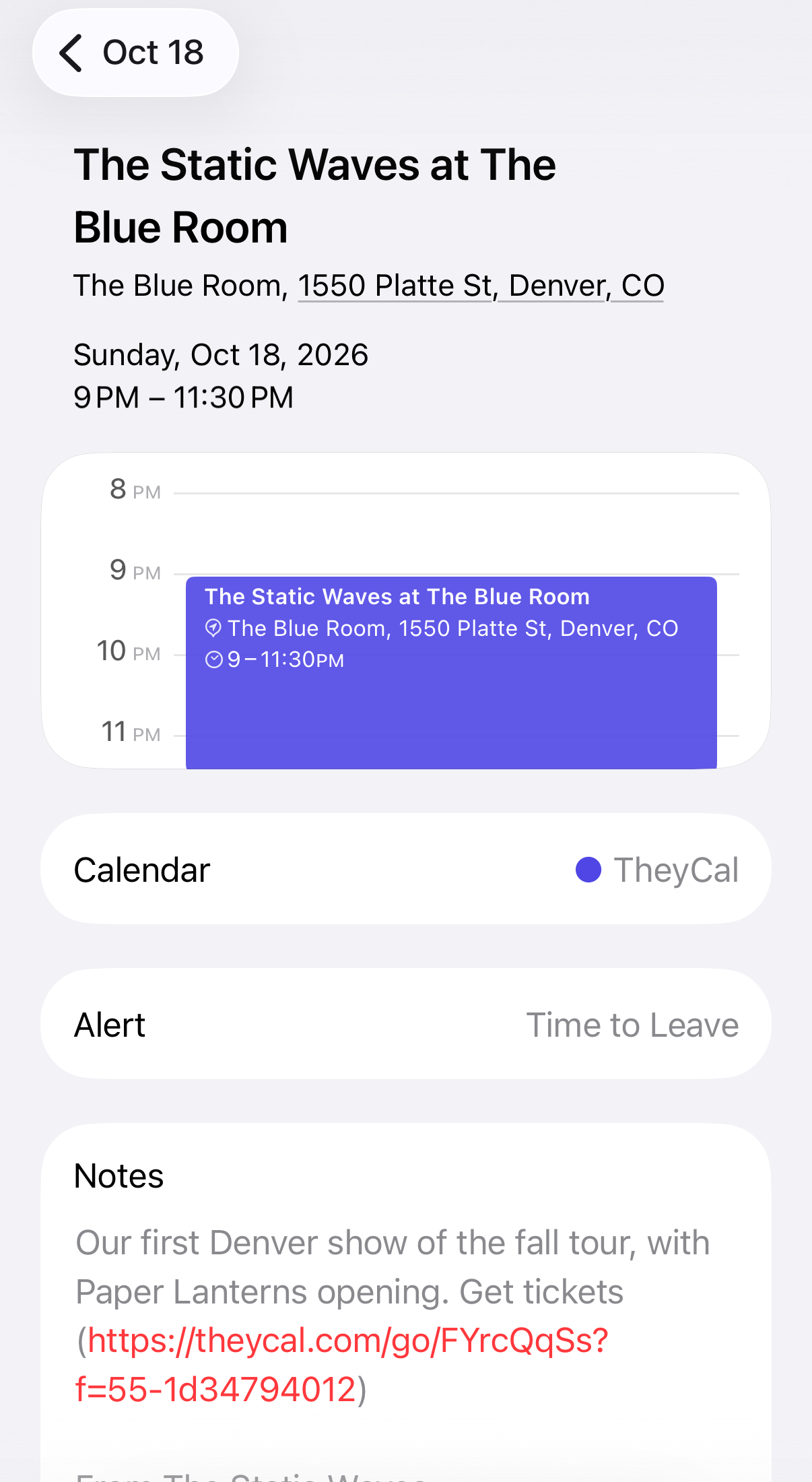
An on-sale alert does its job around the moment tickets go on sale, and the show can be months off after that. Putting it in the fan's calendar keeps the date where they'll see it on the day, with the ticket link and an alert before doors. There are four ways to get it there:
- Bandsintown's calendar sync. In the Bandsintown app, a fan who taps Set Reminder on a show can switch on Calendar Sync for themselves, and it adds their upcoming events to the phone's default calendar.
- An “Add to calendar” button on your site, which gives a fan a copy of one show. That copy stays as it was if the show changes.
- A calendar subscription. Fans subscribe once and get every date. Changes reach them when their calendar app next checks, and our guide on why a subscribed calendar isn't updating gives each app's timing.
- A connected calendar. Fans sign in with Google or Microsoft and give permission for your shows to be written into their calendar, so a change lands there within moments.
Our guide to “Add to calendar” buttons and subscriptions compares the last three in detail.
What happens when a show changes?
To tell your Bandsintown followers about a change, you can post a message to them. What happens to the copies already in fans' calendars depends on how the show got there.
| How the show got into their calendar | You move it | You cancel it |
|---|---|---|
| “Add to calendar” button | Their copy keeps the old time | It stays in their calendar |
| Calendar subscription | Moves when their app next checks | Drops out when their app next checks |
| Connected calendar | Moves within moments | The tool deletes it |
Where TheyCal fits
We make TheyCal, and for bands it handles the calendar part. Fans follow from the link in your bio or a QR code on the merch table, then connect Google or Microsoft or take a calendar link for Apple Calendar and others. Shows go in by hand or from a spreadsheet of the whole tour. If your website has a calendar feed, TheyCal can read it so new dates come through on their own.
The ticket link sits in the event, and TheyCal counts the taps on it. Upload a fan list with a city column and you can send a show only to the followers in that city. In Google and Outlook calendars your shows are marked as free time, so they don't make anyone look busy, and a cancelled show comes off fans' calendars. Announcements and on-sale alerts stay with the tools above, Bandsintown among them.
Common questions
Can Bandsintown put my shows in fans' calendars?
Bandsintown's fan app has a Calendar Sync setting that adds the shows a fan has set reminders for to their phone's default calendar, once the fan switches it on in their own settings.
Can I send a show only to fans in one city?
For announcements, Bandsintown lets you aim a message at fans around a location. TheyCal can aim a show at the followers in one city when your uploaded list gives their cities, and everyone else keeps getting the shows you send to all your followers.
What should the calendar event say?
Put the band and the venue in the title, door and set times in the description, the venue's address in the location so the map opens, and the ticket link near the top of the description.
Do fans need another app?
A calendar copy shows up in the calendar app they already use. Seated says there's no app to install for its alerts, and Laylo can reach fans with a plain text message.
Sources
- Bandsintown for Artists Help: Event notifications
- Bandsintown for Artists Help: Message your followers
- Bandsintown for Artists Help: Event Reminders
- Bandsintown for Artists Help: On-Sale
- Bandsintown for Artists Help: API for fan opt-ins
- Bandsintown Help: How do I sync My Upcoming Events to my mobile device calendar?
- Seated
- Seated Help: How do reminders work?
- Laylo
- Laylo: Text your fans
- Laylo Help: Announce a Tour like LANY