How did this event get in my calendar?
Events arrive by invitation, from your email, through a subscription or from an app you connected. How to tell which one, and how to stop each kind.
By Armen Suny · Updated
The short answer
Events get into a calendar four ways: someone invited you, your email app found a booking in a message, you subscribed to a calendar, or an app you gave calendar access added it. The calendar an event sits in is the quickest clue to which one it was. To keep more from arriving, switch off the route it came by, with the steps below for each one.
What are the ways in?
| Route | What it looks like | How to stop it |
|---|---|---|
| An invitation | The event names an organizer, and an invitation email came with it | Report it, and limit whose invitations go on your calendar |
| Found in your email | A flight or a hotel booking from a message you got | Turn off events from email in your mail or calendar settings |
| A subscribed calendar | It sits in a calendar of its own, and you can't edit it | Unsubscribe from that calendar |
| An app you connected | It sits in your own calendar, with no invitation | Use the app's own settings, then remove its access |
Did someone send you an invitation?
Anyone who has your email address can send you a calendar invitation. In Google Calendar, the “Add invitations to my calendar” setting decides which of them reach your calendar. On “From everyone”, which Google gave as the Workspace default, Google says “All invitations are automatically added to your calendar.”
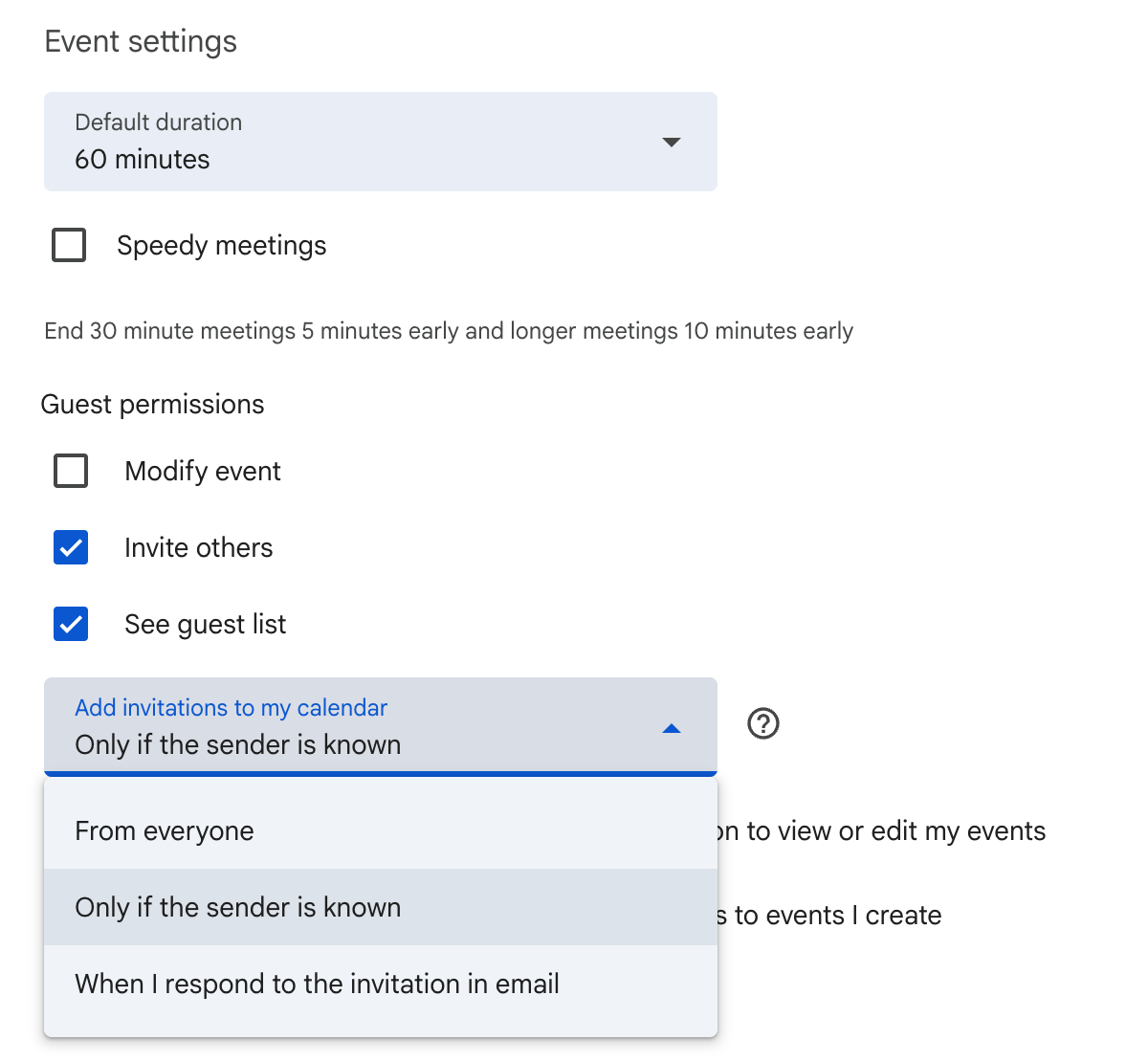
In Google Calendar on a computer, open the event, click More actions, then Report as spam. Google takes it off your calendar, along with the whole series if it repeats. The button only works for events sent from Google Calendar. When one sender keeps at it, you can block them from a computer, which removes that event and keeps their future invitations off your calendar. To keep invitations from strangers off your calendar, set “Add invitations to my calendar” to “Only if the sender is known” under Settings, Event settings. Our guide to Google's known-senders setting explains who counts as known.
On an iPhone, for an event from someone outside your contacts, Apple's steps are Report Junk, then Delete and Report Junk. Our guide to spam calendar events on iPhone has the rest.
Did your email app add it?
Gmail and Outlook can both turn a booking email into a calendar event. On an iPhone, Siri does something close to it.
Gmail. On a computer, open Google Calendar's settings and, under General, Google Workspace smart features, untick “Show events from Gmail”. Google switches events from Gmail on by default everywhere except the European Economic Area, Japan, Switzerland and the UK.
Outlook.com and Outlook on the web. Go to Settings, Calendar, Events from email. For each kind of event you can choose “Only show event summaries in email”. Microsoft's list covers flight, hotel and rental car reservations along with package deliveries.
iPhone. Siri can suggest events it finds in apps like Mail and Messages, such as flight reservations and hotel bookings. Apple's guide puts the switch under Settings, Apps, Calendar, where Show in App sits under Siri. On a Mac, suggested events wait in a Siri Suggestions calendar, and Apple says turning that calendar off deletes any suggestions you haven't confirmed.
Did you subscribe to a calendar?
A subscribed calendar is a separate calendar that someone else keeps filled. Apple describes it as read-only, so you won't be able to edit its events. On an iPhone, tapping a link to a calendar file is enough to start a subscription. Spam calendars use the same route, and Apple lists them among scams to watch for.
Unsubscribing removes every event in it. On an iPhone, open Calendar, tap Calendars, tap the info button next to the calendar and choose Unsubscribe. In Google Calendar, calendars added from a link are listed under Other calendars.
Did an app you connected add it?
When you sign in to an app with your Google or Microsoft account and give it permission to manage your calendar events, it can write events into your calendar directly. Google Calendar's spam button won't help here, since Google says events “created by another provider, app, or service can't be reported as spam.” For spam that keeps appearing on an Android device after you switch on “Only if the sender is known”, Google says you “may want to review which apps have access to your calendar”, and its Android spam help shows how.
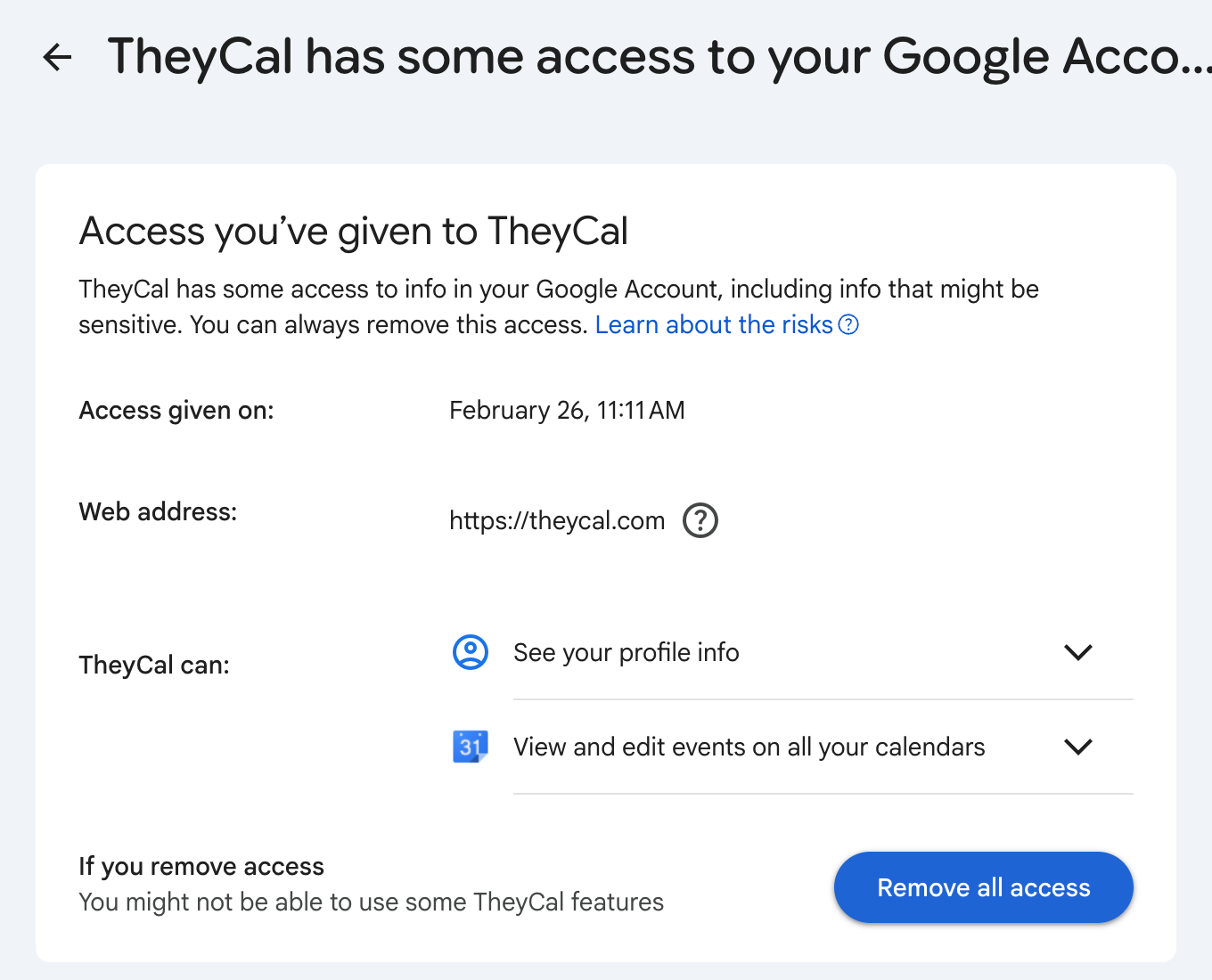
To cut an app off, open your Google Account's linked apps page, choose Access to your Google Account, select the app, then See details and Remove all access. Google says the app then can't access your Google Account. The events it already added stay where they are, since it can no longer reach your calendar to take them off. Google's Android help says the same of phone apps: taking away an app's calendar permission “doesn't delete the events already on your calendar.” If the app has its own way to stop sending events, use that first.
Where TheyCal fits
We make TheyCal, which puts businesses' events on the calendars of people who follow them. Its events arrive by two of these routes, and both start with you following a business from its page. If you connected Google or Microsoft, TheyCal adds the events to that calendar as an app you connected. On Apple Calendar or another app, you subscribed to a private link, and the events sit in a calendar called TheyCal, each one ending with the business's name and the address of a page where you can change what you get. That page asks you to sign in, and if you signed up with only your name and email, “Forgot?” on the sign-in page lets you set a password.
To stop one business, unfollow it from your TheyCal Following page, and its upcoming events come off your calendar. If you want a break from everyone you follow, pause your calendar in TheyCal, which takes all their upcoming events off until you resume. On Apple Calendar you can also unsubscribe from the TheyCal calendar, which clears it in one go.
Common questions
Why can't I delete an event from a calendar I subscribed to?
Subscribed calendars are read-only. Unsubscribe from the whole calendar, or hide it by unticking it in your list of calendars.
Does “Only if the sender is known” stop every unwanted event?
It covers invitations. Google's help says that if spam still shows up on an Android device after you turn it on, you “may want to review which apps have access to your calendar”.
I deleted an event and it came back. Why?
Something is still adding it. Find its route in the table above and switch that route off.
Why is my flight on my calendar when I never added it?
Your email app found the booking. Gmail adds events from Gmail unless you untick that setting, and Outlook and Siri have their own versions, covered above.
Sources
- Google Calendar Help: Manage invitations in Calendar
- Google Calendar Help: Report inappropriate calendar invitations & events
- Google Calendar Help: Block someone in Google Calendar
- Google Workspace Updates: Prevent spam by adding invitations from known senders only to your calendar (July 2022)
- Google Calendar Help: Block calendar spam on Android
- Google Calendar Help: Manage your events from Gmail
- Google Calendar Help: Subscribe to someone else's calendar
- Google Account Help: Manage links between your Google Account & apps from other developers
- Microsoft Support: Automatically add events from your email to your calendar
- iPhone User Guide: Create and edit events in Calendar on iPhone
- Calendar User Guide for Mac: Use Siri Suggestions in Calendar
- iPhone User Guide: Set up multiple calendars on iPhone
- Apple Support: How to delete calendars and remove events on your iPhone
- Apple Support: Recognize and avoid social engineering schemes