Will your calendar invites show up? Google's known-senders setting
Google Calendar can hold back invitations from senders a person doesn't know. Who counts as known, and how a business can get its events seen.
By Armen Suny · Updated
The short answer
Google Calendar has a setting that adds an invitation to someone's calendar only when they know the sender. With it on, an invitation from a business they've never dealt with arrives as an email, and the event stays off their calendar until they click Add to calendar or reply Yes or Maybe. In Workspace organizations the setting starts at “From everyone” unless an admin changes it. Some organizations have switched their people to the stricter option, and since August 2026 Workspace admins can set the loosest option their users are allowed to pick.
What does “Only if the sender is known” do?
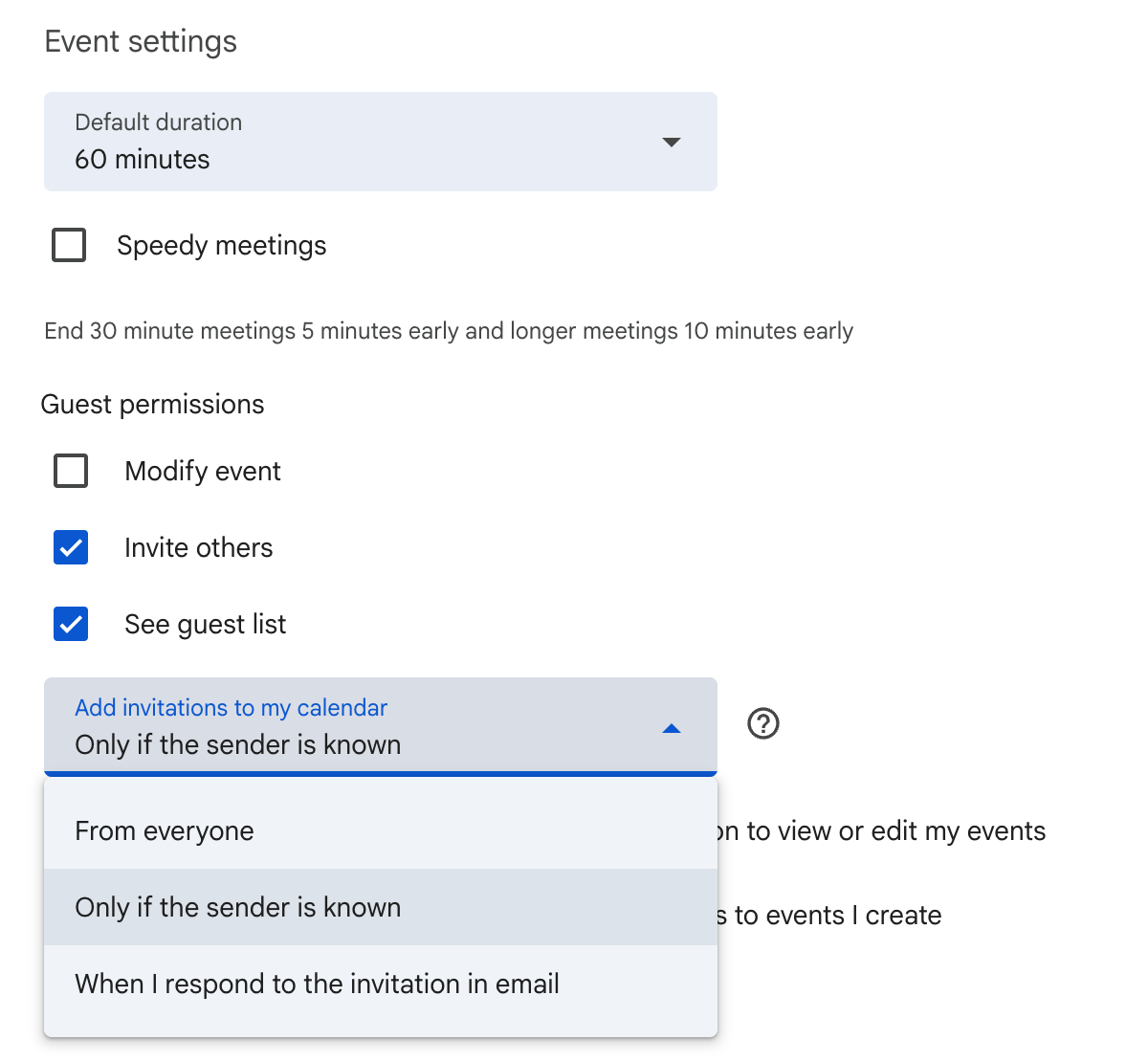
It's one of the choices in Google Calendar on a computer under Settings, Event settings, “Add invitations to my calendar”. Each choice decides what happens when an invitation reaches that person.
| Setting | What happens to an invitation |
|---|---|
| From everyone | Google: “All invitations are automatically added to your calendar.” |
| Only if the sender is known | Added straight away when the sender is known. From anyone else, the person gets the invitation email and decides whether to add it. |
| When I respond to the invitation in email | Google: “An event is added to your calendar only after you respond to the email notification.” |
Google announced the known-senders option in July 2022 for Workspace customers and personal Google accounts. For Workspace, it gave showing invitations from everyone as the default, which admins could change for their domain. For personal accounts, Android Police reported in February 2023 that Google appeared to be testing “Only if the sender is known” as the default with a handful of users.
Who counts as a known sender?
Google counts the people in your contacts and the people in your own organization as known. It also counts “someone you previously interacted with”. Once you mark a sender as known, Google adds their later invitations to your calendar automatically.
A customer on a personal Gmail account doesn't share an organization with your business. Your address counts as known to them only if they've saved you as a contact or have interacted with you before, by Google's measure.
Who has it switched on?
Anyone can choose it in their own settings. Workspace admins can also set it for the people they manage, picking a default and the least restrictive option users may choose for each organizational unit or group. Google's August 2026 update made those limits apply to existing users as well as new ones.
Lewis & Clark College turned it on for its campus in May 2026 to cut down calendar phishing, and told people that invitations would “only be automatically added to your schedule if they come from known senders”. Brown's IT help shows its users how to switch the setting on themselves.
What happens to an invitation from a business they don't know?
The person gets an email, and nothing appears on their calendar. Google's developer documentation spells out the next step for a guest with this setting: an event from an organizer they don't know goes on their calendar once they click Add to calendar or reply Yes or Maybe in the invitation email. The same goes for an invitation sent as a calendar file attached to an email.
A business sending event invitations to a customer list depends on that email being read, because a customer who skims past it has no event on their calendar to remind them later.
How can a business get its invitations onto customers' calendars?
- Ask customers to save your address as a contact. Google's developer documentation suggests the same fix: have the guest add the organizer to Google Contacts ahead of time.
- Ask them to mark you as known the first time an invitation arrives. Google then adds your later invitations automatically.
- Make the email stand on its own. Put the event's date and time in the subject line and the first sentence, so a customer who never adds it still knows when to turn up.
- Skip invitations entirely when you have a run of events to share. People can subscribe to your calendar or connect theirs. Our guide to getting events onto customers' calendars compares the options.
Inviting a whole list in one go raises a separate privacy problem, covered in our guide to sending a calendar invite without showing everyone's email.
Where TheyCal fits
We make TheyCal. A follower who signs in with Google gives TheyCal permission to add and change events in their Google Calendar, and TheyCal then writes each business event straight into that calendar through Google's calendar API. The events carry no guest list, and no invitation email goes out. Google's developer documentation says that with write access to someone's calendar, an app can add an event to it directly, “independently of their setting to add invitations”. Outlook calendars get the same treatment through Microsoft's calendar API. People on Apple Calendar and other apps subscribe to a private calendar link instead.
Followers can find TheyCal on their Google Account's linked apps page and remove its access whenever they want.
Common questions
Does this setting affect people on Outlook or Apple Calendar?
It's a Google Calendar setting, so it covers invitations that reach a Google calendar. Apple's iCloud has a separate option for receiving invitations by email instead of in the Calendar app.
Can a customer block our invitations?
Yes. On a computer, Google Calendar lets people block another Google Account, which removes the event they blocked from and keeps that sender's future invitations off their calendar. For senders without a Google Account, Google points people to blocking the address in Gmail.
If our system marks guests as having accepted, does the event show up?
Google's API reference warns about this. Guests with “Only if the sender is known” or “When I respond to invitation in email” “might have their response reset to needsAction” when an event is added with a response already set, and then they won't see it on their calendar until they change their response in the invitation email.
What about apps a person has connected to their calendar?
An app the person gave calendar access to adds events through that access. For spam that still turns up on an Android device after “Only if the sender is known” is on, Google says you “may want to review which apps have access to your calendar”, and its Android spam help shows how. Apps linked to a Google Account can have their access removed there.
Sources
- Google Calendar Help: Manage invitations in Calendar
- Google Workspace Help: Automatically add events to calendars
- Google Workspace Updates: Prevent spam by adding invitations from known senders only to your calendar (July 2022)
- Google Workspace Updates: New admin controls for adding invitations to Google Calendar (August 2026)
- Google Calendar API: Invite users to an event
- Google Calendar API reference: Events: insert
- Google Calendar Help: Block someone in Google Calendar
- Google Calendar Help: Block calendar spam on Android
- Google Account Help: Manage links between your Google Account and apps from other developers
- Android Police: Google's starting to enable Calendar spam protection by default (February 15, 2023)
- Lewis & Clark Information Technology: Security Update: New Google Calendar Protections for Campus
- Brown University OIT: How to Prevent Spam Events on Your Google Calendar
- iCloud User Guide: Set up how you send and receive invitations for iCloud Calendar