How to send a calendar invite without showing everyone's email
Meeting invites have no Bcc line. How to hide the guest list in Google Calendar and Outlook, and when to send each customer a copy of their own.
By Armen Suny · Updated
The short answer
A calendar invite carries one guest list, and by default every guest can read it. In Google Calendar, untick “See guest list” before you send, and Google says guests won't see each other. New Outlook for Windows and Outlook on the web have a Hide attendee list option under Response options, which classic Outlook for Windows lacks. For a long customer list, give each person a copy of their own: an email sent Bcc with the event attached, or an event created in each person's calendar.
Why does a calendar invite show everyone's email address?
Everyone you invite gets the same event, and the guest list is part of it. Google Calendar turns on the permission that lets guests see that list by default, according to Google's help page on sharing events. Outlook lists attendees for everyone unless the organizer hides them. Email has a Bcc line for this problem, and Microsoft says “There is currently no way to add a person as a true Bcc recipient to a meeting request.”
So an invite sent to fifty customers works like an email with fifty addresses in the To line, and each of them gets a look at who else buys from you. In October 2025 The Register reported that Cifas, an anti-fraud nonprofit, had sent a calendar invite to a session about its JustMe app that exposed the email addresses of “dozens of individuals working across the fraud space”. Over a dozen sat in the To field, with another 45 in CC.
How do you hide the guest list in Google Calendar?
- Open the event and choose Edit event.
- Find the guest permissions. Google's help pages call them “Guest permissions” in one place and “Guests can” in another.
- Untick See guest list. With it off, Google says invited guests won't see other guests on the invite.
- Untick Modify event as well. Google says guests who can modify an event can edit all its fields and “view the guest list”.
- Untick Invite others if you'd rather guests didn't forward it. Google says new guests who respond to a forwarded invite get added to the guest list.
- Save, and send.
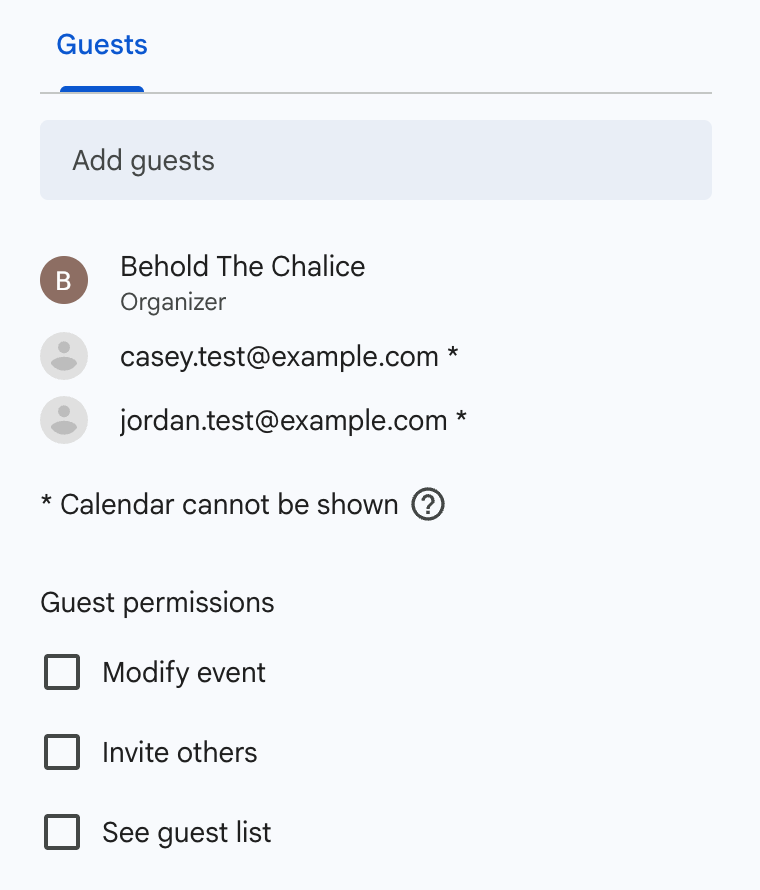
Turning off See guest list also stops the event's share link from working, so Google's invite-by-link option needs the list visible. Before the real send, invite two addresses of your own and open the invite in one of them to check what a guest sees.
How do you hide attendees in Outlook?
In new Outlook for Windows and Outlook on the web, create or edit the meeting, open Response options and choose Hide attendee list. Microsoft says each attendee then sees only the organizer and themselves, and it points to this option for people looking for a Bcc line, which meeting requests don't have. Classic Outlook for Windows doesn't offer it, so anyone on classic Outlook needs one of the routes below.
What about sending each person a copy of their own?
An email sent Bcc can carry the event as a calendar file, or as an “Add to calendar” link. Customers in the Bcc box can't see each other's addresses, and each of them saves a separate copy. Those copies stay as they were on the day people saved them, though, so if the time moves you'll have to write to everyone again. Our guide to “Add to calendar” buttons and subscriptions covers what happens to those copies.
You can also make a separate event for each customer with that person as the only guest, and their invite then lists only you and them. Past a dozen or so customers it turns into an afternoon of copying and pasting, and every change means editing each event again.
How do the options compare?
| Option | Where it works | What each guest sees | Watch for |
|---|---|---|---|
| See guest list unticked | Google Calendar | No other guests, per Google | It's set per event, and the event's share link stops working |
| Hide attendee list | New Outlook for Windows, Outlook on the web | No attendee list | Missing from classic Outlook for Windows |
| Bcc email with the event attached | Any email app | Their own address | Copies don't change when the event does |
| One event per customer | Any calendar | You and themselves | Slow for long lists, and a change means editing every copy |
| Events added to each person's calendar | Google and Microsoft calendars, with permission | An event with no guest list | Each person signs up once first |
Where TheyCal fits
We make TheyCal, and it skips invites altogether. Customers follow a business once from its join page. For people on Google or Microsoft, we create each event straight in their own calendar with no guests on it, so there's no list for anyone to see. People on Apple Calendar and other apps get a private calendar link that belongs to them alone. When the business moves an event, we update the copy in every connected calendar, and calendar links show the change once the person's app next checks.
Common questions
Does Google Calendar have a Bcc field for guests?
See guest list does that job. Untick it before you send and Google says invited guests won't see other guests.
Can I hide the guest list after the invite has gone out?
Both settings live in the event's editor, and Microsoft's steps cover editing a meeting as well as creating one. Anyone who opened the invite before your change has already seen the list.
Can guests forward the invite to other people?
In Google Calendar they can while Invite others is ticked, and the people they forward it to join the guest list once they respond. Untick it to stop that.
How many people can I invite to one Google Calendar event?
Google lets you invite up to 200 people to an event. Inviting a Google Group raises the ceiling to 100,000.
Sources
- Google Calendar Help: Share events from your Google Calendar
- Google Calendar Help: Invite people to your Calendar event
- Google Calendar Help: Invite groups to calendar events
- Google Workspace Learning Center: Tips to collaborate in Calendar
- Microsoft Support: Add Bcc recipients to a meeting request
- Microsoft Support: Show, hide, and view the Bcc (blind carbon copy) field in Outlook for Windows
- The Register: Anti-fraud body leaks dozens of email addresses in invite mishap (October 21, 2025)