How dealerships get customers to come back for service
Book the first visit before the car leaves the lot and time each reminder from that car's last service. Steps for service managers.
By Armen Suny · Updated
The short answer
Book the first service before a new car leaves the lot, then time every reminder after that from the car's own last visit. Each reminder should name the car and carry a link to your online scheduler. Update the service date on the day the car comes in, so the next reminder counts from the right day. Start with owners of new cars. In Cox Automotive's 2025 study, 54% of dealership service visits for cars under two years old were at the dealership that sold the car, down from 72% in 2023.
Where are dealerships losing service customers?
Cox Automotive's 2025 Service Industry Study puts the dealer share of service visits at 29%, against 33% in 2018. Its slides say the decline “is greatest among vehicles 5 years old or less.” Cox also asked where new cars go when they visit a dealership. For cars under two years old, 54% of those visits in 2025 were at the dealership that sold the car, compared with 72% in 2023, so the rest went to another dealer. Our page of dealership service retention statistics gives each figure with its source and date.
How do you get the first service visit booked?
Do it at delivery, while the buyer is still at the dealership and the salesperson knows when the first service falls due. Walk them over to the service desk and introduce an advisor by name.
Book that first visit before they drive off. Then make sure the date ends up in their phone's calendar, where they'll see it again months later when the confirmation email is long gone.
When should service reminders go out?
Time each one from that car's last visit. Someone who was in for an oil change last month gets nothing from a reminder sent to your whole list. Work out each car's due date from its last service and the interval you use for that kind of vehicle, and send the reminder about a week before. Where your intervals differ for trucks or EVs, set them by vehicle type.
| When | What to do |
|---|---|
| At delivery | Book the first service and get it into the buyer's calendar |
| A week before a car is due | Send a reminder that names the car and links to your scheduler |
| Two weeks after the due date, if they haven't booked | Send one follow-up |
| The day the car is serviced | Update its service date, so the next reminder counts from that day |
| After several missed due dates | Stop that car's reminders and ask the customer whether they still have it |
Keep the dates current. A reminder that shows up two weeks after the customer paid you for that exact service tells them nobody's keeping track. Update the date at checkout, and remove a car as soon as you hear it's been sold.
What should a service reminder say?
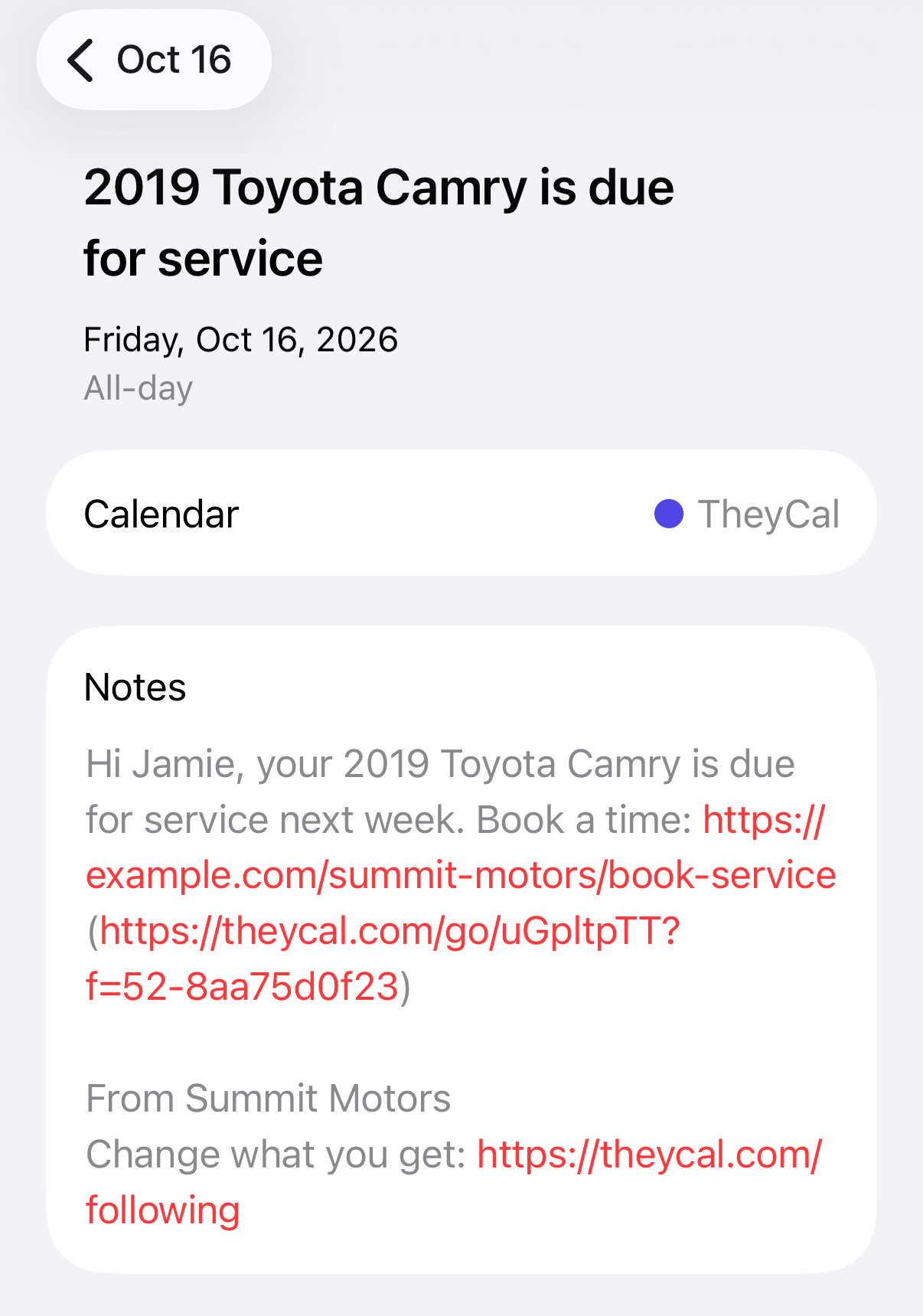
- The car's name. “Your 2019 Camry is due for service” tells a two-car household which one to bring in.
- What's due, if you know it from the mileage on file or the maintenance schedule.
- A link to book that opens your online scheduler, so booking takes a tap.
- A price wherever you can give one. In Cox's survey the average spend was $261 at a dealership and $275 at a general repair shop, and a price in the reminder lets customers see where you stand before they shop around.
What brings them back after the first visit?
How the visit goes. In Cox's survey, 45% had a frustration at the dealership. The study's slides rank service taking longer than expected first, named by 24% of them, and finding out how much the dealer charges and being pushed toward extra services next, at 13% each. When the car will take longer than you said, let them know early. Give a price up front and call if anything gets added to it.
Cox also asked about the next car. Of owners who had returned to the dealer for service in the past 12 months, 74% said they were likely to buy from that dealer again, against 44% of those who hadn't, according to the study's slides.
Where TheyCal fits
We make TheyCal, and it puts a service reminder for each customer's car into their own calendar. It works next to your DMS and your online scheduler. The reminder carries your booking link, so appointments still get made in your scheduler.
- Your customer list comes from a spreadsheet. TheyCal doesn't connect to a DMS directly. You export customers and their vehicles (name, email, year, make, model, last service, mileage) and upload the file, and a newer upload only ever moves service dates forward.
- Each car gets its own schedule. The service reminders setup makes a car due six months after its last service, which you can change, with a different interval by vehicle type if you want one. A week before the due date an all-day event titled with the car's name goes on the customer's calendar, with an alert at 9 AM the day before. A second one follows two weeks after the due date.
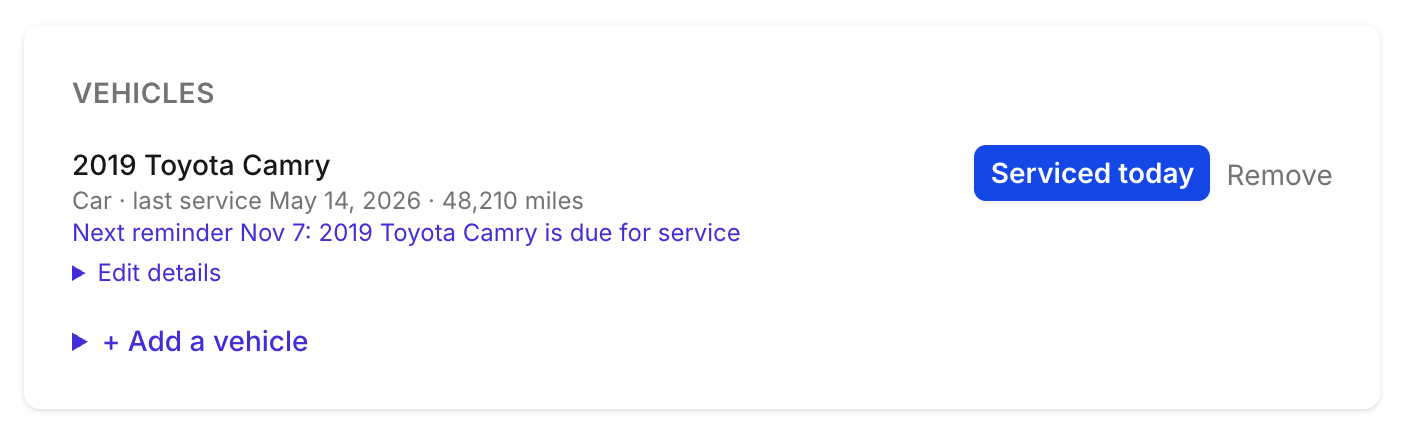
- A visit resets it. Tap “Serviced today” on the customer's page, or upload a newer list, and that car's reminders move to match, so the follow-up comes off their calendar once they've been in. By default, after three due dates go by with no new service date, a car's reminders stop.
- Customers keep their cars current. On their Following page in TheyCal they can add a car, or tap “I sold it” on one they no longer have, and a sold car's reminders come off their calendar.
Customers follow your dealership once, from an invitation email or a QR code at the service desk. People on Google or Outlook connect that calendar, and everyone else gets a private calendar link for Apple Calendar and other apps. Links in the reminders are click-tracked, so you can see who tapped through to book.
Common questions
How often should a dealership send service reminders?
Send one for each due date, about a week ahead, and one follow-up if the customer hasn't booked. Base each due date on that car's last service and the interval you use for its type.
What if a customer gets their car serviced somewhere else?
Give them a way to update the service date or mark the car sold. If nothing changes after several due dates, stop that car's reminders.
How can I tell which reminders bring people in?
Track the booking link to see who tapped through. Then check your scheduler for who finished booking, and compare that with the cars that came in.
Do calendar reminders replace email and text?
They sit alongside them. Your scheduler can keep sending its confirmations, and a calendar event puts the due date on the customer's own calendar for the week it matters.