Why is my calendar event showing the wrong time?
Check the time zones on your device and in your calendar app first, then look at how the business's calendar file writes its times.
By Armen Suny · Updated
The short answer
Calendar apps show each event in the time zone your device or the app itself is set to. So when an event sits a whole number of hours away from where it belongs, check those settings first. If they're right and the wrong times all come from one business's calendar, the mistake is in how that business wrote its events, and they have to fix it at their end.
What should you check first?
- Your device's time zone. Apple's advice for a wrong zone is to let the device set the time and zone automatically under Date & Time, and to set the zone by hand if it still shows the wrong one.
- The calendar app's own zone. Google Calendar on the web keeps a primary time zone in its settings. Its Android app has a Use device time zone switch, and with that off it uses the zone you picked from its menu. Set both to where you are, or one event can show one time on your laptop and another on your phone.
- Time Zone Override on an iPhone. While it's on, Apple Calendar shows times in the zone you picked even when you travel. You'll find it under Settings, Apps, Calendar. Turn it off and Calendar goes back to the zone of your current location.
- Whose events are wrong. When your own events look fine and the wrong ones all belong to one business or club, their calendar is the next place to look.
How does a calendar file say when an event starts?
Subscription links and downloaded .ics files follow a standard, RFC 5545, which allows three ways to write a date and time. An all-day event uses a plain date instead. Your app reads whichever form the publisher picked and works out what to show you.
| Form | How it looks in the file | What your app does with it |
|---|---|---|
| UTC | DTSTART:20261120T020000Z |
The Z marks one fixed moment. Your app converts it to your zone, so a 7 PM show in Denver reads 9 PM in New York. |
| Local time with a zone | DTSTART;TZID=America/Denver:20261119T190000 |
Same result, as long as the file also defines that zone in a VTIMEZONE block. |
| Floating | DTSTART:20261119T190000 |
No Z and no zone. It shows 7 PM in whatever zone you're in at the moment. |
| Date only | DTSTART;VALUE=DATE:20261119 |
An event for the whole day of November 19, with no clock time and no zone. |
The standard says a file must include a VTIMEZONE for each zone it names. It also says floating time “SHOULD only be used where that is the reasonable behavior,” and its example is someone who's busy from 11 AM to 1 PM every day in whatever zone they're in. A concert or a tee time needs a fixed time, written in UTC or with a zone.
Which mistakes in a calendar file move an event?
A zone named without its definition
A bug report on Discourse's forum shows how this goes wrong. Its event export wrote TZID=Europe/Berlin with no VTIMEZONE block, and the reporter says a 17:00 event showed at 18:00 in Outlook on Windows while the forum itself showed 17:00. Their explanation is that Outlook fell back to Berlin's winter offset, UTC+1, which puts events during summer time an hour late. A fix that adds VTIMEZONE blocks to the export was merged in September 2026.
A floating time where a fixed one was meant
Members at home see the right time, so the mistake goes unnoticed until someone travels. A member who flies from Denver to New York then sees Saturday's 11 AM brunch at 11 AM New York time, two hours ahead of the real start.
The publisher's calendar set to the wrong zone
Someone types 7 PM into a calendar that's still set to UTC. The file then says 7 PM UTC, which is noon in Denver in November, and every app shows noon because that's what it was given.
All-day events written as times
A New York publisher who enters an all-day event as midnight to midnight Eastern has made a timed event. In Los Angeles it runs from 9 PM the evening before until 9 PM on the day.
Can a change in the clock rules move events?
Yes, and one is under way in Canada. British Columbia made its March 8, 2026 change the final one, and on November 1, 2026 clocks across most of the province stay where they are, on UTC-7 all year. Google's help lists events whose time zone is in Alberta, British Columbia, Manitoba or the Northwest Territories as ones that “may appear one hour late on and after November 1, 2026.” Google says it will move most of them back an hour itself in October 2026. On the web, an event you organized also gets a Move one hour earlier button.
Google's time zone help gives the cause: “events created before we knew about the change might be in the wrong time zone.” If you live in one of those places, look over your events from November on once your phone and apps have updated.
What can a business do about it?
- Set the zone on the calendar you publish from before entering events, and check the zone on any event held somewhere else.
- Write times as UTC, or as local times with a TZID and the matching VTIMEZONE block in the same file.
- Enter all-day events as all-day, so the file carries a plain date.
- Ask anyone who reports a wrong time for the event's name, the time they see, the app they use and the zone their phone is set to. Then subscribe to your own link on a phone set to another zone and compare.
How TheyCal writes times
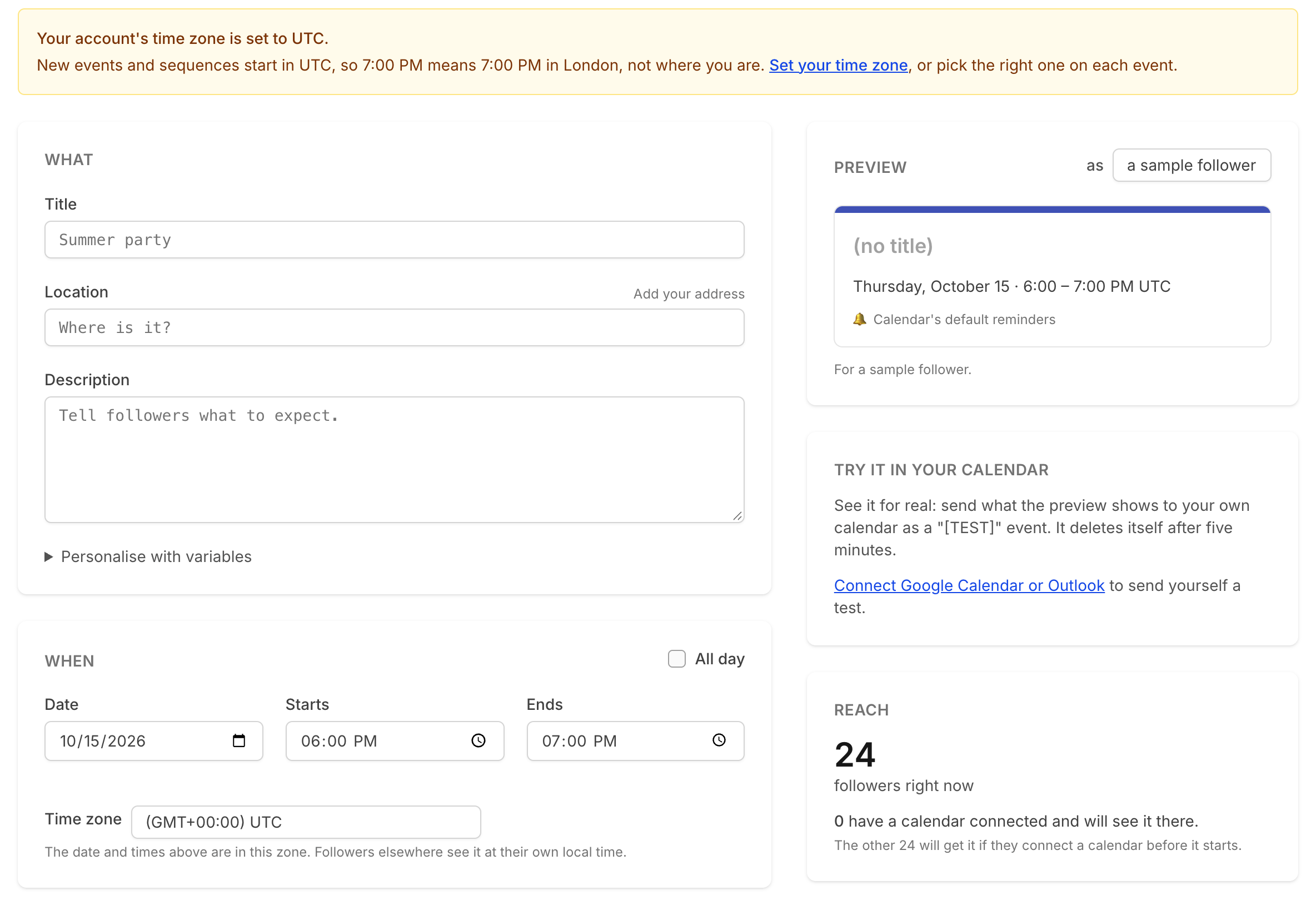
We make TheyCal. Each event has a time zone, which starts as the business's own and can be changed on the event form, and our screens label times with it. New accounts start on UTC, so the event form shows a warning until the business sets its zone.
In the calendar links we give people on Apple Calendar and other apps, a timed event's start is a UTC moment ending in Z, and all-day events are plain dates. For connected Google calendars we send that UTC moment with the event's zone attached. Microsoft calendars get the moment in UTC, and each app converts it to the local time of whoever's looking.
Common questions
Why is the event right on my phone and wrong on my computer?
Check whether the two are set to different zones. In Google Calendar, compare the primary time zone in the web settings with the Android app's Use device time zone switch.
Why is an event off by an hour for only part of the year?
Somewhere along the way a fixed offset is standing in for a zone's daylight saving rules. The Discourse report above fits that pattern, and another member there confirmed that events outside summer time weren't affected.
Why does an all-day event start the day before?
The publisher wrote it as a timed event from midnight in their zone. A date-only event carries no zone, so it stays on its date wherever you are.
Can I stop an event from shifting when I travel?
For your own events in Apple Calendar on a Mac, turn on time zone support under Calendar, Settings, Advanced, then pick Floating as the event's time zone. Apple says that keeps it from moving when you view a different time zone. On an iPhone, Time Zone Override holds the whole calendar in one zone.
Sources
- RFC 5545, section 3.3.5: Date-Time
- RFC 5545, section 3.2.19: Time Zone Identifier
- RFC 5545, section 3.6.5: Time Zone Component
- RFC 5545, section 3.6.1: Event Component
- Discourse Meta: Calendar/Event ICS export: wrong time (+1 h) when importing into Outlook with TZID=Europe/Berlin
- Google Calendar Help: Use Google Calendar in different time zones
- Google Calendar Help: Fix Calendar events for Canadian daylight saving time
- iPhone User Guide: Schedule or display events in a different time zone in Calendar
- Calendar User Guide for Mac: Use different time zones
- Apple Support: If you can't change the time or time zone on your Apple device
- Province of British Columbia: B.C.'s new time zone (Pacific time)