Why aren't links in my calendar event clickable on iPhone?
Calendar files carry an event's description as plain text, so an HTML link can show up as raw tags in Apple Calendar. Writing each address out in full fixes it.
By Armen Suny · Updated
The short answer
Calendar files and subscription links carry an event's description as plain text.
When a publisher writes a link there as HTML, with the address hidden behind words like “Book now”, the tags arrive as ordinary characters, and a Scouting forum member saw them that way in Apple Calendar on a Mac and an iPhone.
The fix is on the publisher's side: write each address out in full in the description, starting with https://.
Services that write events into Google Calendar or Outlook through their APIs can send HTML, and linked words stay linked there.
Why do links break in calendar events?
The standard for calendar files, RFC 5545, gives an event's DESCRIPTION the TEXT value type, which it defines as “human-readable text”. The one piece of formatting it provides for is a line break. So a link written as <a href="https://example.com/book">Book now</a> reaches the app as exactly those characters, tags included.
What the app does with them varies. In a thread titled “ICS subscription displays HTML tags in Apple Calendar”, a Scouting forum member subscribed to a calendar feed by URL and found its HTML formatted in Google Calendar, while Apple Calendar on a Mac and an iPhone showed the raw tags. Another member saw the tags in Outlook on the web as well.
What are the ways to put a link in an event?
| Method | What it looks like | How apps treat it |
|---|---|---|
| Address written out in the description | Tickets: https://example.com/tickets |
Plain text, as the standard expects. Any app that shows the description shows the whole address. |
| HTML in the description | <a href="…">Tickets</a> |
Plain characters as far as the standard goes. In the Scouting thread, Google Calendar formatted it and Apple Calendar showed the tags. |
| An HTML copy beside the plain text | X-ALT-DESC;FMTTYPE=text/html:… or STYLED-DESCRIPTION |
Microsoft's iCalendar spec describes X-ALT-DESC as “an alternate format for the DESCRIPTION property (an HTML body)”. RFC 9073 added STYLED-DESCRIPTION in 2021. Next to it, the DESCRIPTION is left out or holds “a plain-text rendering of the styled text.” |
| The URL property | URL:https://example.com/tickets |
A web address for the event, kept apart from the description. The standard allows it once per event. |
| Written in through an API | An app connected to your Google or Microsoft account | Google's API says a description “can contain HTML”, and Microsoft Graph says an event's body “can be in HTML or text format”. |
The standard also lets a text property point to a fuller version elsewhere through its ALTREP parameter, and a property that does so still has to carry its ordinary text.
Where did the event come from?
On an iPhone, events from a calendar link you subscribe to, or from an .ics file you open, arrive as calendar files with a plain-text description. Apple Calendar on a Mac keeps notes and a URL as separate fields on an event, which matches the split in the standard between DESCRIPTION and URL. If a link works in one of your calendars and breaks in another, compare where the two events came from before blaming the phone.
What should a business do?
- Write every address out in full, starting with
https://, with a few words before it saying where it goes. - Check what your calendar tool exports. If it sends HTML, look for a setting that writes plain text, or one that adds a plain-text version with the addresses spelled out.
- Put the main link in the URL property if your tool lets you set one, and keep it in the description as well.
- Test on a real iPhone. Subscribe to your own calendar link, open an event and look at what a customer sees.
How TheyCal handles links
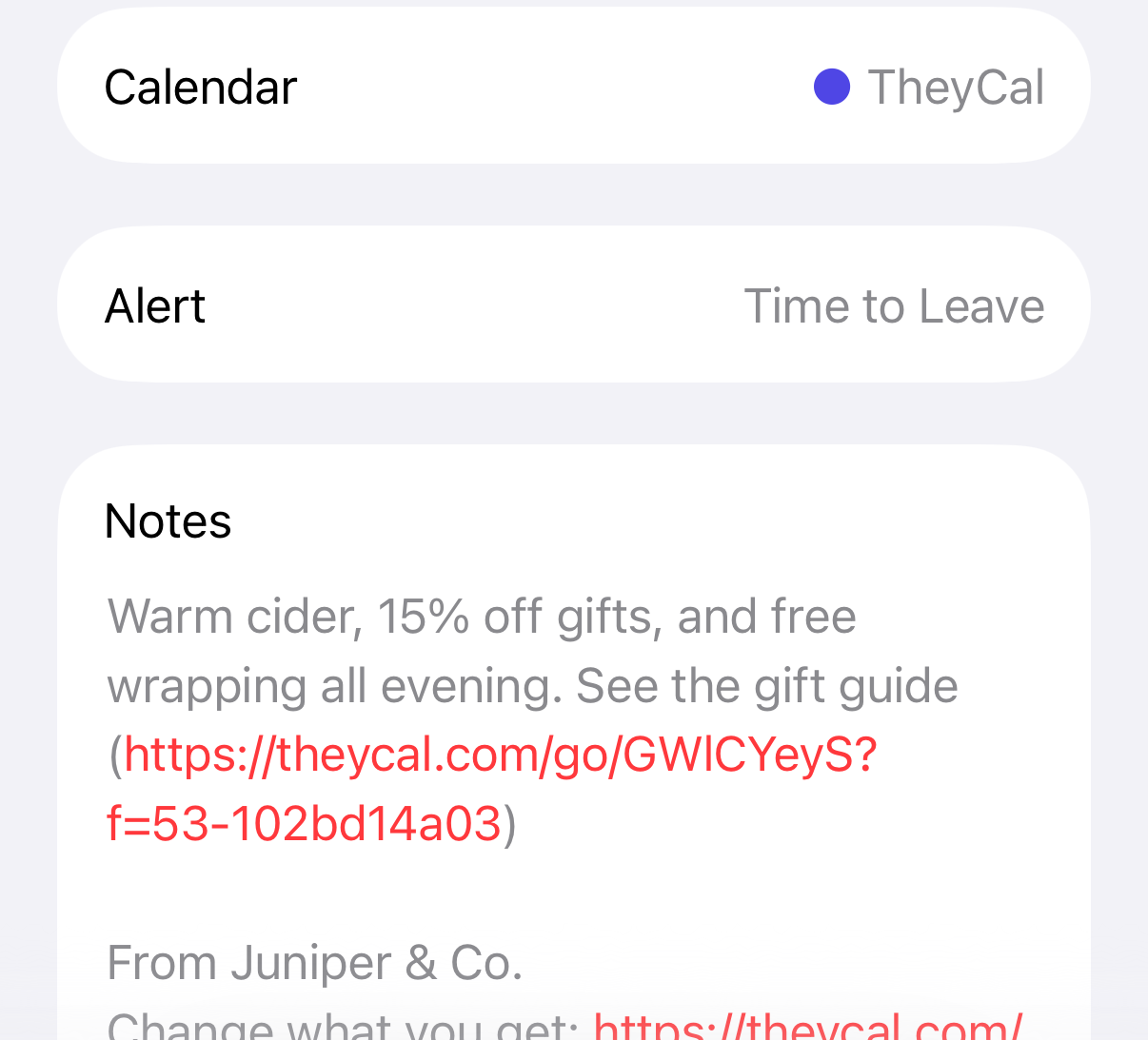
We make TheyCal, and its events go out two ways. In Google and Microsoft calendars, which people connect with their permission, we send the description as HTML, so linked words stay linked. Calendar links for Apple Calendar and other apps get plain text, with each link's address written out in parentheses after its words, like “See the menu (https://theycal.com/go/…)”. An address pasted on its own is written once.
That address is a theycal.com/go/ link. When someone opens it, we count the click and send them on to the address the business wrote, and the business can see clicks for each event and each link.
Common questions
Why does my event show code like <a href=…>?
The publisher put HTML into a field that calendar files define as plain text. Let them know, and copy the address out of the tags in the meantime.
Why is the same link clickable in Google Calendar?
Google Calendar formats HTML in descriptions. Its API says a description “can contain HTML”, and in the Scouting forum thread it showed a subscribed calendar's HTML properly where Apple Calendar showed the tags.
Can an event have more than one link?
The description can hold as many addresses as you like. The URL property appears once per event.
Does Outlook show formatted links from a calendar file?
Microsoft's iCalendar spec says that when a file includes an X-ALT-DESC marked as HTML, the HTML gets converted to rich text and stored with the event on import. In the Scouting forum thread, a member saw a feed's HTML tags as plain text in Outlook on the web.
Sources
- RFC 5545, section 3.8.1.5: Description
- RFC 5545, section 3.3.11: Text
- RFC 5545, section 3.2.1: Alternate Text Representation
- RFC 5545, section 3.8.4.6: Uniform Resource Locator
- RFC 9073, section 6.5: Styled-Description
- Microsoft [MS-OXCICAL]: Property: X-ALT-DESC
- Google Calendar API reference: Events
- Microsoft Graph: event resource type
- Calendar User Guide for Mac: Add notes, a URL, or files to events
- Scouting Forums: ICS subscription displays HTML tags in Apple Calendar