What Apple Mail Privacy Protection did to email open rates
Apple Mail can load an email's content before anyone reads it, which inflates open rates, so event marketers do better measuring clicks and turnout.
By Armen Suny · Updated
The short answer
Since September 2021, Apple Mail has offered Mail Privacy Protection, which downloads the remote content in an email in the background, whether or not the person reads it. Platforms such as Mailchimp count an open when a tiny image in the email loads, so emails to people who use the feature get counted as opened when nobody looked. Apple says the feature stops senders from seeing whether a message was opened, and that it doesn't extend to links. For an event, judge each email by the clicks it gets and the people who turn up.
What does Mail Privacy Protection do?
It's a setting in Apple's Mail app on iPhone and Mac, and Apple offers it on iCloud.com too. Apple's iPhone guide says it hides your IP address “so senders can’t link it to your other online activity or determine your exact location,” and that it “prevents senders from seeing if you’ve opened the email message they sent you.” On an iPhone, people switch it on under Settings, Apps, Mail, Privacy Protection, where the option is called Protect Mail Activity, and it needs Limit IP Address Tracking turned on as well.
According to Apple's Mac guide, remote content gets “privately downloaded in the background when you receive a message (instead of when you view it).” Apple's privacy page adds that this happens by default, regardless of whether you engage with the email. Each download passes through two relays “operated by different entities,” and the second one hands the sender's server a generalized identity in place of your IP address.
Why does that inflate open rates?
Mailchimp tracks opens with “a tiny, transparent image” placed in each email, and its help page says each load of that image gets counted as an open. With the feature on, “Apple Mail will preload pixels, even if your contact hasn’t opened the email,” Mailchimp writes. Emails sitting in Apple Mail then show as opened “regardless of the contact's activity.”
Those opens carry less detail too. Litmus, which reports which email apps people read mail in, says opens from people using Mail Privacy Protection “do not pass along specifics of the email client version and platform,” and it counts them inside its Apple Mail figures. It describes a similar gap for Gmail, whose opens reach it through Gmail's image cache.
What happened to the numbers when it launched?
Apple rolled the feature out in Mail on iOS 15 and iPadOS 15 on September 20, 2021. Litmus published early numbers at the end of that month, comparing September 1 to 19 with the 20th to the 30th. Its “Apple Mail Privacy” category, covering every open the feature touched, took 6.6% of opens after launch, up from 1.5% among people running the beta. The iPhone's share fell from 38.2% to 33.0%, and Gmail, at 36.5%, passed it as the most popular email client.
Litmus also ran the numbers on the assumption that all of those private opens came from iPhones, and found the iPhone would then still have ranked first. How far your own opens are inflated depends on how many of your readers use Apple Mail with the setting on, since Mailchimp says the effect only applies to Apple Mail users.
What stops working when you rely on opens?
Mailchimp's help page lists what changes for its own users when readers have the feature on.
- Open rate as a health check. Opens from Apple Mail users “inflate your overall open rates,” so the number climbs with the share of your list on Apple Mail.
- Resending to people who didn't open. Mailchimp says a resend to non-openers “won't be delivered to contacts that opt-in to Apple MPP,” which skips Apple Mail readers who never saw the first email.
- Subject line tests judged on opens. A/B tests based on open rates “may not be accurate,” and Mailchimp suggests judging them on clicks.
- Segments and automations built on opens. Contact ratings for Apple Mail users come out “higher than expected,” and an automation triggered by an open goes out to a larger audience.
What should event marketers measure instead?
Apple's iPhone guide says Mail Privacy Protection “does not extend to links or email attachments,” so a click on a tracked link still reaches you. Mailchimp calls clicks and purchases “stronger signs of engagement than opens.” For an event, the useful numbers sit further down the line.
- Clicks on the link to the event page or the tickets, tagged per email so you can tell one send from the next.
- Sign-ups and tickets sold that trace back to each email.
- Attendance from check-ins, scanned tickets, kept bookings or the list at the door. Hold back a random group that doesn't get the email and compare turnout, the method behind the studies in our guide Do reminders reduce no-shows?.
- Replies, when the email asks people to answer.
Where TheyCal fits
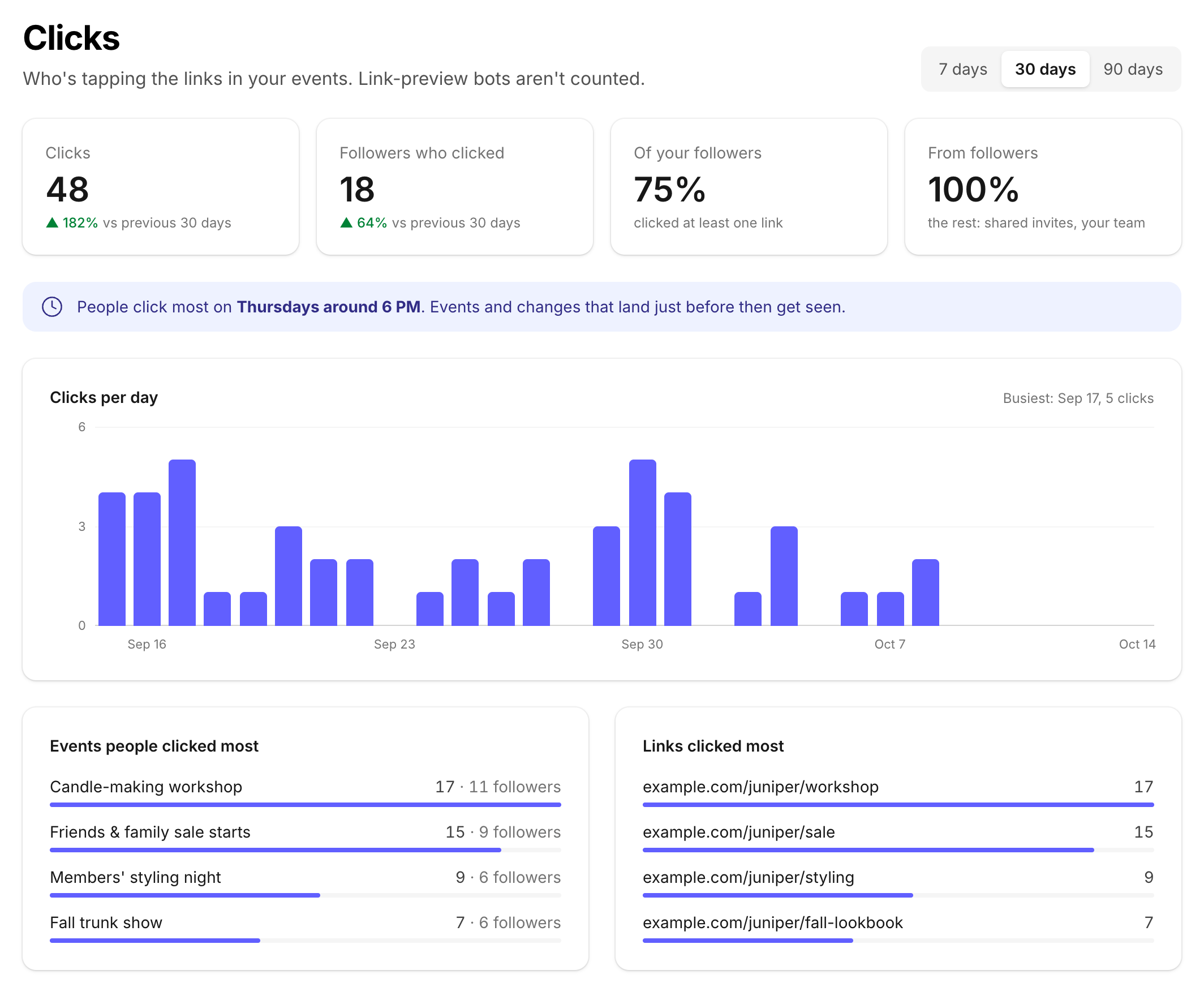
We make TheyCal, which puts a business's events in its followers' own calendars. Links in an event's description become tracked links, and the business gets a Clicks page showing clicks per day and the share of followers who clicked at least one link, along with the events and links people clicked most. Link-preview bots aren't counted. TheyCal works alongside your email, and our comparison of reminders by calendar, email, text and app push covers how the channels differ.
Common questions
Can I turn Mail Privacy Protection off for my subscribers?
Each reader controls it in the Mail settings on their own device, and senders have no say in it.
Does Mail Privacy Protection affect link clicks?
Apple's iPhone guide says the protection doesn't extend to links or attachments such as PDFs. Mailchimp says it still reports click activity and click rate for readers on Apple Mail.
Why did my open rate jump in the fall of 2021?
Apple Mail on iPhone and iPad started downloading remote content in the background for people who turned the feature on, from September 20, 2021. If your opens rose then and clicks stayed flat, look at those background downloads first.
Is an open from Apple Mail always fake?
Some of those readers did open the email. Your platform can't tell them apart from the background downloads, which is why clicks and attendance make better measures.
Sources
- Apple iPhone User Guide: Use Mail Privacy Protection on iPhone
- Apple Mail User Guide: Use Mail Privacy Protection on Mac
- Apple iCloud User Guide: Use Mail Privacy Protection on iCloud.com
- Apple Legal: Mail Privacy Protection & Privacy
- Mailchimp: Apple Mail Privacy Protection (MPP) FAQs
- Litmus: Email Client Market Share in September 2021, early data on the impact of Apple's Mail Privacy Protection
- Litmus: Email Client Market Share